 Insta360
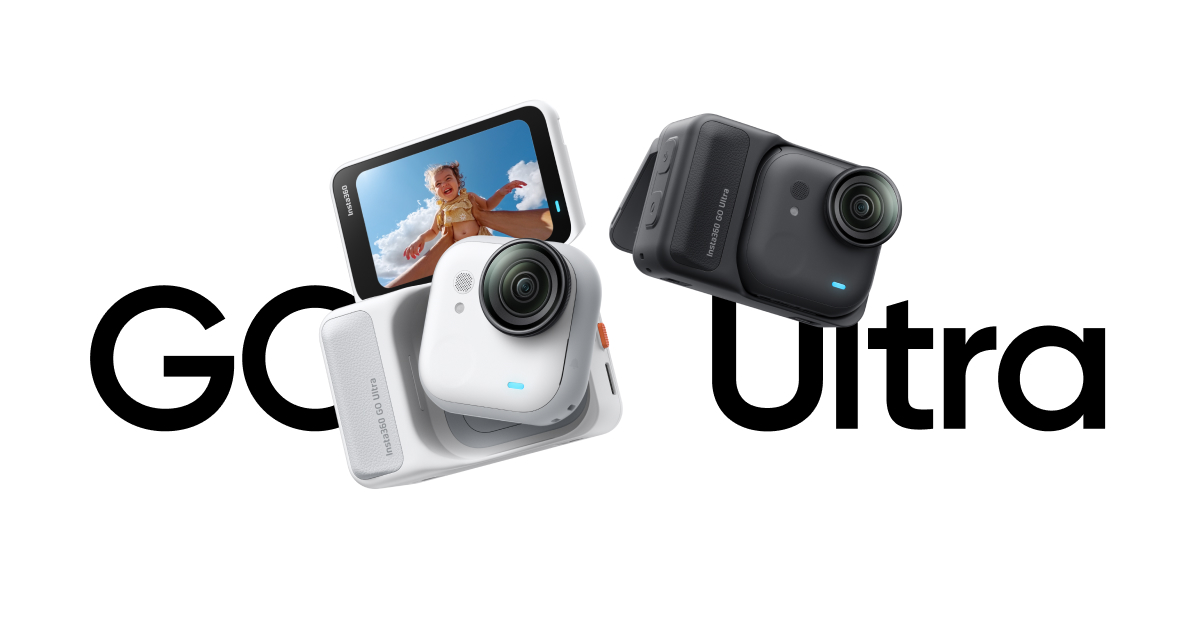
Insta360 GO Ultra
This is for the hyper-active documentarian who wants pro-grade video flexibility from a device so small it disappears, but you'll pay for it in battery management and phone compatibility requirements.
User Manual
Why it stands out
The good and the bad
- Unbelievably small and light for true 4K capture, making it the ultimate 'wear and forget' camera.
- Massive 3.5+ hour total runtime with the Action Pod turns it from a clip cam into a proper all-day shooter.
- Professional-grade flexibility with log color profiles and multiple high-bitrate codecs for serious editors.
- Extremely versatile slow-motion (up to 240fps) lets you turn any action into a cinematic moment.
- Requires a modern, powerful phone (A12 chip or Snapdragon 855+) to use all features, locking out older devices.
- The tiny standalone camera only lasts 70 minutes, forcing you to manage the Action Pod for longer shoots.
- No built-in storage; you must buy and manage a microSD card, adding cost and complexity.
What Real Users Say
A versatile, magnetic POV camera with great stabilization and audio, but image quality and waterproofing compromises make it a niche choice at a premium price.
- Excellent stabilization for walking, running, and biking[2][3][5][7]
- Very good built-in microphone quality with effective wind reduction[2][3][5]
- Great battery life and fast charging compared to previous GO models[1][2][4]
- Magnetic mounting and detachable camera offer unique flexibility for POV shots[2][3][5][7]
- Removable microSD card slot (vs. internal storage on GO 3S) is a major upgrade[1][2][4]
- Action Pod acts as a remote monitor/controller with good wireless range[2][4][5]
- Significantly better low-light performance than GoPro (via PureVideo mode)[1][3][4]
- Image quality (sharpness, detail) is not as good as flagship action cameras (Ace Pro 2, DJI Action) despite similar price[1][4][6]
- Action Pod (case) is NOT waterproof, only the detached camera is[1][2][5]
- Requires separate $15 aqua lens for sharp underwater footage; standard lens is fuzzy underwater[1][4]
- New, incompatible mount system; accessories not shared with GO 3S or other Insta360 cameras[1][2][4]
- Larger and heavier than GO 3S, losing some stealth/concealability[1][2][4]
- Price is high, putting it in direct competition with superior flagship action cameras[1][4]
Best For
- +Solo creators/vloggers who want hands-free, discreet POV footage without holding a camera
- +Travelers and adventurers who value mounting flexibility (magnetic) over ultimate image quality
- +Runners, cyclists, and active users who need stable, chest-mounted footage with good audio
- +Users upgrading from GO 3S who want better battery, low-light, 4K60, and removable storage
Avoid If
- −You prioritize the absolute best image quality and detail; get an Ace Pro 2 or DJI Action instead
- −You need a fully waterproof setup (case + camera) for frequent water activities
- −You have a large collection of GO 3S mounts and want full accessory compatibility
- −You want the smallest possible form factor; the GO 3S is significantly smaller
- −You are on a tight budget; it's expensive for its image quality tier
- Can overheat and shut down after ~61 minutes of continuous 4K60 recording when in the Action Pod [4] [4]
- Voice control is hit-or-miss and unreliable in noisy environments [5] [5]
- HDR mode can sometimes create artifacts and strong contours in tough lighting [2] [2]
- Occasional wireless connection drop between camera and Action Pod, especially in hot/humid conditions [9] [9]
- No double-tap to record safeguard like GO 3S, leading to accidental recordings [2] [2]
- Screen on Action Pod is always exposed and susceptible to scratches [5] [5]
AI-aggregated summary of publicly available YouTube reviews and Reddit discussions. This does not represent Pindear’s editorial opinion. Sources may include sponsored content. Last updated Apr 16, 2026.
Specifications
Sourced from Insta360 official documentation.
Common Questions
What type of microSD card does the Insta360 GO Ultra use?
Is the Insta360 GO Ultra waterproof?
Does the Insta360 GO Ultra support Apple Find My?
How do I set up and activate the Insta360 GO Ultra for the first time?
How do I charge the Insta360 GO Ultra?
You might also like
Editorial summary, highlights, pros and cons are AI-assisted and reflect Pindear’s independent perspective. Always verify critical details with the manufacturer before purchase. Spotted an error? Let us know.