 Insta360
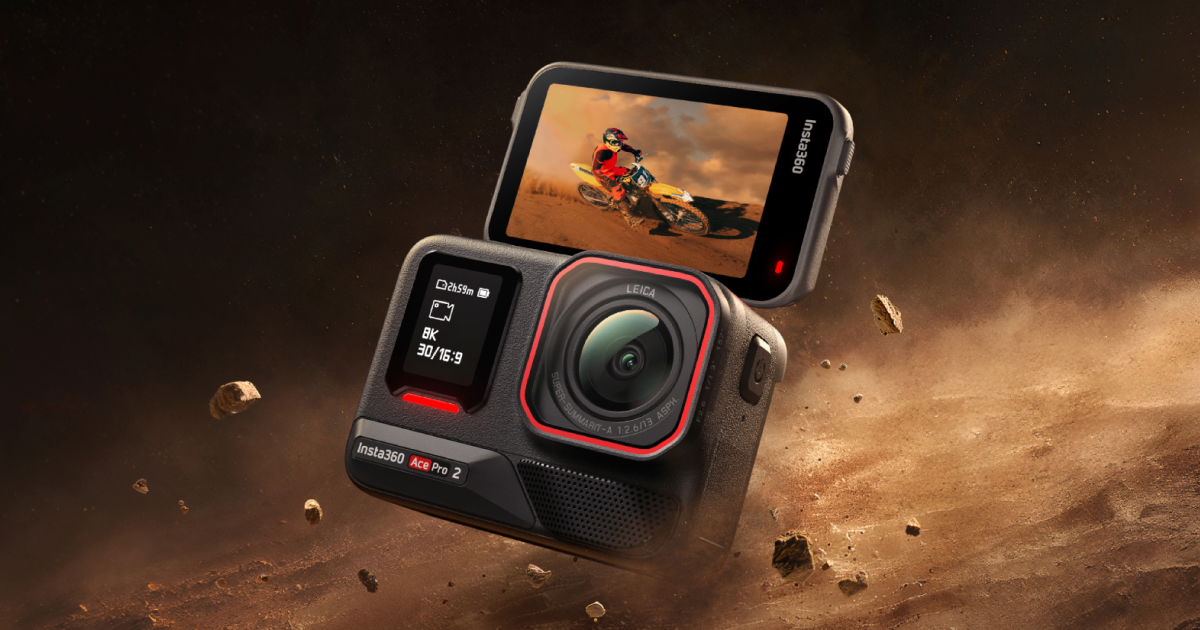
Insta360 Ace Pro 2
This is the overkill action cam for creators who prioritize cinematic image quality and pro-level audio integration over simplicity and budget.
Documentation
User Manual
Read the Insta360 Ace Pro 2 Manual
Setup, features, troubleshooting — formatted for web reading
Highlights
Why it stands out
Major Upgrade
Leica color for action
You get cinematic, ready-to-share looks straight from the camera, saving hours of color grading.
8K is finally usable
Shoot in 8K to crop and reframe your shots in post without losing 4K quality.
Best-in-Class
Shoots in near darkness
The large sensor and F2.6 lens mean you can capture usable footage in low-light situations where other action cams fail.
Audio you can actually use
Connect professional wireless mics or Bluetooth headsets for crystal-clear audio, turning vlogs and motovlogs pro.
Pros & Cons
The good and the bad
Pros
- Massive creative flexibility with multiple aspect ratios (4:3, 16:9, 2.35:1) for different platforms and looks.
- Shoot worry-free in rain or down to 12m underwater without a bulky housing.
- Fast charging gets you back to shooting in under an hour when the 3-hour runtime isn't enough.
- Pro-level control with manual ISO, shutter speed, and a flat color profile (I-Log) for serious editors.
- Shoot high-speed action at 240fps for buttery smooth slow-motion replays.
Cons
- No built-in storage; you must buy a fast, expensive microSD card (up to 1TB) separately.
- The wide 13mm lens captures everything, including your handlebars and helmet chin—expect to crop or use accessory lenses.
- App requires a relatively new, powerful phone; older devices will struggle with previews and AI features.
Reference
Specifications
Max Resolution8K
Max Frame Rate240fps
Max Bitrate180Mbps
Video FormatsMP4
Photo Resolution50MP
Photo FormatsJPG, DNG RAW
Sensor Size1/1.3"
ApertureF2.6
Focal Length13mm
Battery Capacity1800mAh
Full Charge Time75 mins
Fast Charge47 mins
Battery Life180 mins
Weight179.4g
Dimensions73.2x53.7x39.5mm
Min Temp-20°C
Max Temp45°C
Waterproof12m
BluetoothBLE 5.2
Wi-Fi802.11 a/b/g/n/ac
USBUSB-C 3.0
Sourced from Insta360 official documentation.
FAQ
Common Questions
What type of microSD card should I use with the Insta360 Ace Pro 2?
Use exFAT format microSD/TF cards with speed classes UHS-I and V30 or above to ensure normal recording. The maximum supported storage is 1TB. Slow cards may affect recording. Recommended compatible cards include specific models from Sandisk Extreme/Extreme Pro and Lexar 1066x series. Always format the card via the camera or app for best performance.
Is the Insta360 Ace Pro 2 waterproof?
Yes, the Insta360 Ace Pro 2 is waterproof up to 39ft (12m) without a Dive Case. For extended use up to 197ft (60m), use the Dive Case. Ensure the Battery Cover and USB Port Cover are free of dirt and completely closed, with the yellow mark covered. After seawater use, rinse in fresh water for 15 minutes, dry thoroughly, and ensure it's completely dry before reuse. Removing/installing the Wind Guard or Mic Cap does not affect waterproofing.
What is Endurance Mode on the Insta360 Ace Pro 2?
Endurance Mode is a low-power setting to extend battery life, providing up to 3 hours of recording in lab conditions at 1080p24fps with Active HDR off. Enable it by swiping down to the Shortcut Menu and turning on Endurance Mode. Note that some features like Gesture and Voice Control are unavailable in this mode. Battery life may vary based on usage and environmental conditions.
Can I use GPS data with my Insta360 Ace Pro 2 videos?
Yes, use GPS Activity Stats in the Insta360 app to overlay data from your smartphone, or use Stats Dashboard for data from Garmin, Apple Watch, COROS, IGPSPORT devices, or FIT/GPX files. Connect the camera to the app, authorize GPS access, and start recording. Note that 360° videos and modes like Timelapse or Slow Motion are not supported. For accuracy, shoot in open outdoor areas and sync timecodes before recording.
How do I set up and activate my Insta360 Ace Pro 2 for the first time?
To activate your Insta360 Ace Pro 2, download the Insta360 App, turn on the camera, and enable Wi-Fi/Bluetooth on your phone. Open the app, tap the camera icon, select your camera (named 'Insta360 Ace Pro 2 **' where ** are the last six digits of the serial number), and follow the on-screen instructions to connect and activate. The app will prompt you to update the firmware if needed. Ensure you confirm the connection on the camera's touchscreen during the first pairing.
💡
Share a tip
Help others get more out of this product
💬
Ask a question
The community and AI are here to help
⭐
Write a review
Share your honest experience
More to explore
You might also like
Editorial summary, highlights, pros and cons are AI-assisted and reflect Pindear’s independent perspective. Always verify critical details with the manufacturer before purchase. Spotted an error? Let us know.