 DJI
DJIDJI Mic Mini
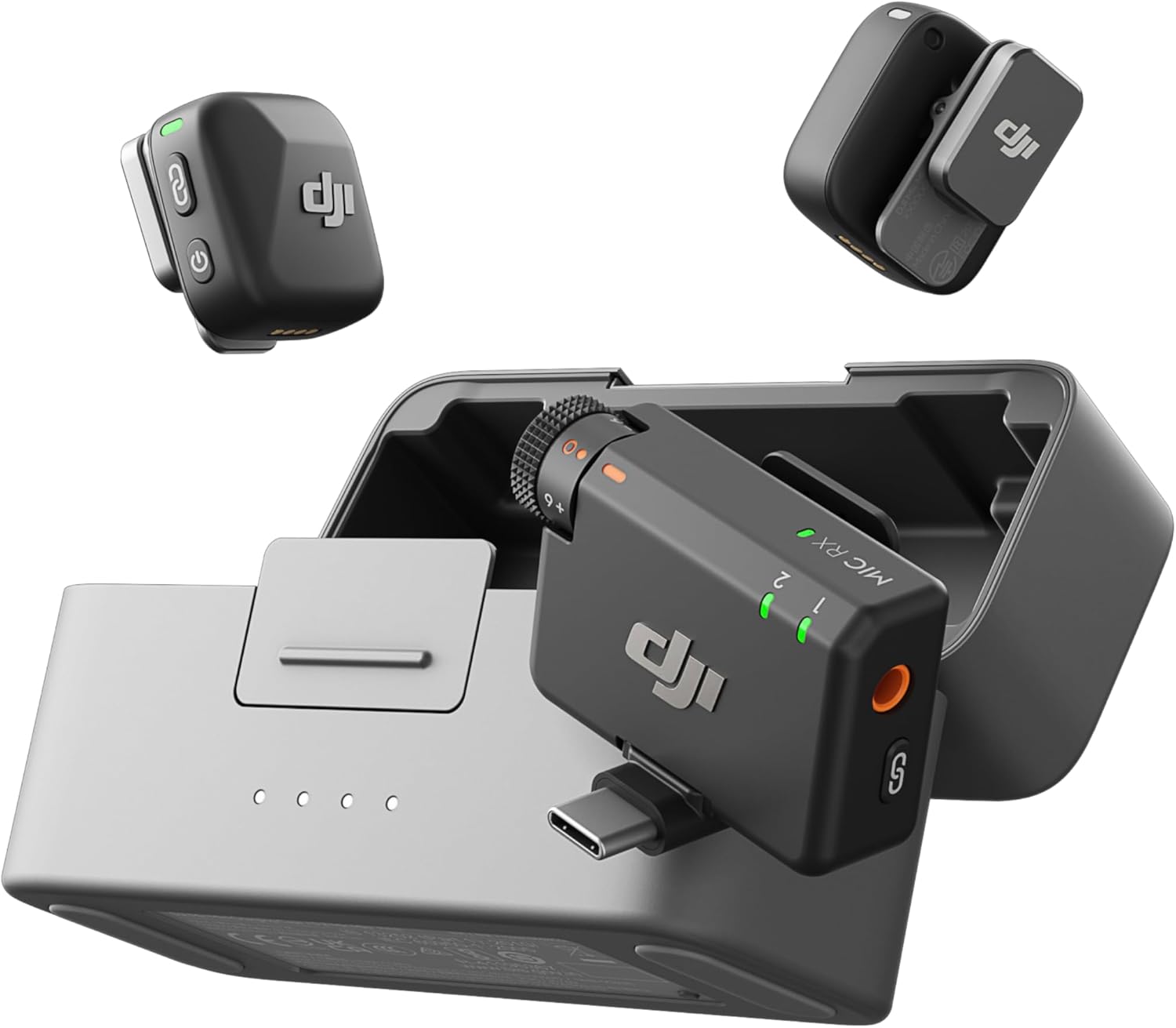
This is the ultimate wireless mic for active creators and run-and-gun filmmakers who need reliable, set-and-forget audio in a package that won't weigh down talent.
For the vlogger who wants clean audio without wearing a full broadcast rig.
Documentation
User Manual
Read the DJI Mic Mini Manual
Setup, features, troubleshooting — formatted for web reading
Highlights
Why it stands out
Best-in-Class
Tiny, all-day transmitters
The 10g mics can run for a full shoot day on a single case charge.
400m wireless range
You can get clean audio even when the subject walks far from the camera.
Major Upgrade
Dual-purpose mobile receiver
A tiny, separate USB-C dongle lets you record directly to your phone, no cables.
Survives a cold shoot
It works down to -10°C, so winter outdoor filming won't kill your audio.
Pros & Cons
The good and the bad
Pros
- Extremely lightweight and compact transmitters disappear on clothing.
- The charging case provides nearly four full recharges, eliminating battery anxiety for multi-day use.
- Bluetooth 5.3 and a dedicated 2.4GHz link offer robust, interference-resistant connectivity.
- Omnidirectional pickup with a 120dB SPL handles loud environments without distortion.
Cons
- The 90-100 minute charge time for individual units is slow for a quick top-up.
- No onboard recording or safety track mentioned in specs—you're reliant on the wireless link.
- The 24dBA equivalent noise floor is good but not class-leading for critical studio work.
Reference
Specifications
Battery Capacity114 mAh
Battery LifeApprox. 11.5 hours
Full Charge TimeApprox. 90 minutes
WeightApprox. 10 g
Dimensions26.55×26.06×15.96 mm
Min Temp-10° C
Max Temp45° C
BluetoothBluetooth 5.3
Sourced from DJI official documentation.
FAQ
Common Questions
What do the LED lights on the DJI Mic Mini transmitter mean?
The DJI Mic Mini transmitter's system status LED indicates battery level, link status, and Bluetooth connection. For example, solid red means 0-10% battery, solid green means linked with the receiver, and solid blue means linked with a Bluetooth device. During charging, it blinks green/blue slowly for 0-25% and so on.
What does a solid yellow LED on the DJI Mic Mini transmitter mean?
A solid yellow LED on the DJI Mic Mini transmitter indicates that noise cancelling is enabled. This LED is specifically the noise cancellation LED, and it turns off when noise cancelling is disabled. You can toggle noise cancelling by pressing the power button on the transmitter.
What does a blinking blue and green LED on the DJI Mic Mini transmitter indicate?
A blinking blue and green LED on the DJI Mic Mini transmitter indicates that it is in linking mode for Bluetooth connections. This occurs when you press and hold the linking button to connect to a phone or other Bluetooth device. Once linked, the LED will turn solid blue to confirm the connection.
How do I turn on the DJI Mic Mini transmitter and enable noise cancelling?
Press and hold the power button on the DJI Mic Mini transmitter for two seconds to power it on. To enable noise cancelling, simply press the same power button once; the noise cancellation LED will light up solid yellow to indicate it's active. Press the button again to disable noise cancelling, turning the LED off.
How do I link the DJI Mic Mini transmitter and receiver manually?
To manually link the DJI Mic Mini transmitter and receiver, press and hold the linking button on the transmitter for two seconds until its system status LED blinks blue and green alternately. Then, press and hold the linking button on the receiver for two seconds until its transmitter status LED blinks green rapidly. Once linked, the status LEDs will turn solid green.
💡
Share a tip
Help others get more out of this product
💬
Ask a question
The community and AI are here to help
⭐
Write a review
Share your honest experience
More to explore
You might also like
Editorial summary, highlights, pros and cons are AI-assisted and reflect Pindear’s independent perspective. Always verify critical details with the manufacturer before purchase. Spotted an error? Let us know.